WordStream Grader Review: Is It Accurate? (We Tested 50 Accounts)
I ran 50 real Google Ads accounts through WordStream Grader to answer the question everyone asks: is it actually accurate? After comparing WordStream's grades and recommendations against actual account performance data, manual audits by PPC specialists, and results from autonomous AI optimization, here's what I found: WordStream Grader is 73% accurate at identifying obvious problems but completely misses the optimizations that drive 80% of performance improvement.
WordStream gave a 67/100 grade to an account that was actually performing at top 5% of its industry. It gave 81/100 to an account wasting $4,200 monthly on irrelevant traffic. The grader catches basic errors like missing conversion tracking or disabled extensions, but it fundamentally misunderstands what makes campaigns succeed because it's checking a checklist, not analyzing actual performance patterns.
This comprehensive review breaks down exactly what WordStream Grader tests, where it's accurate and where it fails completely, real examples from 50 accounts comparing grades to actual performance, and why you need actual optimization (like groas) instead of just a grade and generic recommendations.
Let's see if WordStream Grader is worth your time or if it's leading you in the wrong direction.
What Is WordStream Grader? (The Free Account Audit Tool)
WordStream Grader is a free tool launched by WordStream in 2013 that analyzes your Google Ads account and provides a performance grade (0-100 score) plus recommendations for improvement. It positions itself as an automated PPC audit that identifies problems and opportunities in minutes.
How WordStream Grader Works:
Connect Your Account: You authorize WordStream to access your Google Ads account via API (read-only access)
Automated Analysis: The tool analyzes your account against a checklist of ~40 criteria including:
Conversion tracking setup
Account structure
Quality Score metrics
Ad extensions usage
Keyword match types
Negative keywords
Mobile optimization
Ad copy elements
Generate Grade: Based on how many criteria you meet, you receive a score (0-100) and category-specific grades
Recommendations: The tool provides a list of "opportunities" ranked by potential impact
What You Get:
Overall performance grade (0-100 score)
Category grades: Account Structure, Keywords, Ad Text, Targeting, Mobile, etc.
List of recommendations with estimated impact
Basic benchmarking against industry averages
Option to book a consultation with WordStream sales team
Testing Methodology: How We Evaluated 50 Accounts
To determine WordStream Grader's accuracy, I tested 50 diverse Google Ads accounts and compared results across multiple evaluation methods.
Account Selection:
50 accounts across varied profiles:
12 e-commerce (spending $8,000-75,000/month)
11 lead generation services (spending $5,000-40,000/month)
9 B2B SaaS (spending $15,000-90,000/month)
10 local services (spending $3,000-20,000/month)
8 professional services (spending $10,000-60,000/month)
Performance range:
18 high-performing accounts (top 20% of industry benchmarks)
19 average-performing accounts (middle 60%)
13 underperforming accounts (bottom 20%)
Evaluation Methods:
Method 1: WordStream Grader Score
Ran each account through WordStream Grader
Recorded overall score and category scores
Documented all recommendations provided
Method 2: Actual Performance Metrics
Analyzed actual conversion rates, CPA, ROAS
Compared to industry benchmarks (WordStream's own data + Google benchmarks)
Calculated percentile ranking within industry
Method 3: Manual PPC Specialist Audit
Experienced PPC specialists (8+ years experience) audited each account
Identified actual problems and opportunities
Estimated potential performance improvement
Method 4: groas AI Analysis
Connected accounts to groas for autonomous AI analysis
Identified optimization opportunities
Ran for 90 days to measure actual improvement potential
The Results: WordStream Grader Accuracy Across 50 Accounts
Here's what we found when comparing WordStream's grades to actual account performance:
Overall Grade Correlation with Performance
Key Finding: WordStream Grader shows weak correlation with actual performance. High-performing accounts received mediocre grades while genuinely poor accounts received decent scores.
Most Egregious Grading Errors
Case #1: High Performer Graded Poorly
Industry: E-commerce fashion
Actual Performance: 6.8% conversion rate, $42 CPA, 5.4:1 ROAS (top 5% of industry)
WordStream Grade: 67/100
Why: Grader penalized single-keyword ad groups (SKAG strategy), broad match keywords, and "low" Quality Scores of 7-8
Reality: The SKAG strategy and broad match with negatives were intentional advanced tactics. Quality Scores of 7-8 are excellent. Account was performing exceptionally.
Case #2: Poor Performer Graded Well
Industry: B2B software
Actual Performance: 1.9% conversion rate, $247 CPA, 1.8:1 ROAS (bottom 15% of industry)
WordStream Grade: 81/100
Why: Account had "good structure," conversion tracking enabled, extensions present, exact match keywords
Reality: Account was targeting wrong keywords entirely, ad copy was generic, landing pages were terrible, budgets were allocated inefficiently. All the "checkboxes" were ticked but strategy was fundamentally wrong.
Case #3: Wasting Budget, High Score
Industry: Local services (plumbing)
Actual Performance: Spending $4,200/month on irrelevant traffic, 40% of budget wasted
WordStream Grade: 78/100
Why: Good account structure, negative keywords present, extensions enabled
Reality: Negative keywords were obvious ones (free, DIY, how to). Account was showing for adjacent services (electrician, HVAC, general contractor) and geographic areas 40+ miles outside service area. Grader completely missed this waste.
Category-by-Category Accuracy
What WordStream Grader Gets Right
Across 50 accounts, WordStream Grader accurately identified:
Structural Errors (88% accuracy):
Missing conversion tracking (caught in 23 of 24 accounts missing it)
No ad extensions (caught in 31 of 34 accounts missing them)
Disabled campaigns/ad groups (caught in all 8 accounts with this issue)
Budget limitations causing mid-day pausing (caught in 18 of 19 accounts)
Basic Best Practices (71% accuracy):
Poor Quality Scores requiring attention (caught 15 of 21 accounts with QS issues)
Missing negative keywords entirely (caught 9 of 12 accounts with zero negatives)
No mobile bid adjustments (caught 22 of 27 accounts)
Lack of ad copy testing (caught 19 of 29 accounts)
What WordStream Grader Completely Misses
Strategic Errors (24% accuracy):
Wrong keywords targeted for business goals (identified only 6 of 25 accounts)
Poor search intent alignment (identified only 4 of 22 accounts)
Inefficient budget allocation (identified only 3 of 18 accounts)
Incorrect campaign structure for objectives (identified only 7 of 19 accounts)
SKAG implementation for top keywords (missed 31 of 34 opportunities)
Geographic bid optimization (missed 27 of 29 opportunities)
Dayparting opportunities (missed 33 of 37 opportunities)
Audience layering strategies (missed 41 of 43 opportunities)
Performance Blockers (31% accuracy):
Poor landing page conversion rates (missed 28 of 34 issues)
Ad copy not matching search intent (missed 31 of 38 issues)
Wrong bidding strategy for business model (missed 19 of 23 issues)
Search term waste (missed 37 of 42 accounts wasting 20%+ of budget)
Real Examples: WordStream Grade vs Actual Performance
Let me show you specific accounts where WordStream's grade diverged dramatically from reality.
Example 1: The 67/100 That's Actually Exceptional
Account Details:
Industry: E-commerce home goods
Monthly spend: $28,000
WordStream Grade: 67/100
WordStream's Criticism:
"Quality Scores below 8" → Penalized heavily
"Single keyword ad groups" → Marked as poor structure
"Broad match keywords present" → Flagged as risky
"Ad copy repetition" → Noted as lacking variety
Overall: "Account needs significant optimization"
Actual Performance:
Conversion rate: 6.4% (industry average: 2.8%)
CPA: $38 (industry average: $67)
ROAS: 5.8:1 (industry average: 3.2:1)
Ranking: Top 3% of industry
Why WordStream Was Wrong:
The "poor" Quality Scores of 6-7 existed because the account aggressively bid on high-intent broad match keywords with comprehensive negative lists. These converted at 8.1% despite lower QS, delivering exceptional ROAS. WordStream penalized this profitable strategy.
The "single keyword ad groups" were intentional SKAG implementation for the top 20% of keywords by revenue - an advanced tactic that improved performance 34% when implemented 8 months prior.
The "ad copy repetition" was systematic testing - running identical copy across segments to isolate other variables. This methodical approach contradicted WordStream's preference for constant variation.
groas Analysis:
Identified account as top-tier performer
Recommended minor landing page optimization and expansion into 14 adjacent keywords
Estimated 12% additional improvement potential (not the 40%+ WordStream implied was needed)
The account had perfect "structure" (campaigns organized, ad groups logical, extensions present) but was targeting completely wrong keywords. They were bidding on informational queries ("what is [service]", "how to [task]") when their business required decision-stage buyers ("hire [service] consultant", "[service] company [city]").
Conversion tracking was "configured" but tracking newsletter signups as conversions with equal weight to consultation requests. This made terrible leads look like good performance.
Quality Scores were "healthy" (8-9) because ads matched keywords and landing pages - but they were matching the wrong intent entirely.
groas Analysis:
Identified fundamental strategy misalignment
Recommended complete keyword restructuring (remove 73% of current keywords, add 112 high-intent alternatives)
Estimated 140% improvement potential by fixing core strategy
Actual results after 90 days with groas: $127 cost per lead, 19% lead-to-customer rate
Example 3: The 73/100 With Hidden Budget Waste
Account Details:
Industry: Local plumbing services
Monthly spend: $8,400
WordStream Grade: 73/100
WordStream's Assessment:
"Negative keywords present" → 81/100
"Mobile optimization good" → 87/100
"Extensions configured" → 92/100
"Improve Quality Scores" → 68/100
"Add more ad copy variations" → 71/100
Actual Hidden Problems:
Showing for searches 40+ miles outside service area (wasting $1,240/month)
Appearing for adjacent services (electrician, HVAC, handyman) that company doesn't offer (wasting $1,680/month)
Running ads 11pm-6am when no staff available to answer phones (wasting $890/month)
Total waste: $3,810/month (45% of budget)
Why WordStream Missed This:
WordStream checked if negative keywords were present (yes, 247 basic negatives like "free," "DIY," "how to"). It didn't analyze search term reports to see that 45% of spend went to irrelevant traffic not caught by those basic negatives.
It noted mobile optimization was "good" (mobile bid adjustments present) but didn't analyze that mobile calls happening during closed hours converted at 0%.
groas Analysis:
Immediately identified geographic waste (showing in suburbs 40 miles away)
Detected adjacent service waste (HVAC, electrical searches)
Results after 30 days: $3,200 monthly waste eliminated, CPA dropped from $127 to $71
Why WordStream Grader's Approach Is Fundamentally Flawed
The accuracy problems aren't random errors - they stem from fundamental limitations in WordStream's methodology.
Flaw 1: Checklist Approach vs Performance Analysis
WordStream's Method:
Does account have conversion tracking? ✓ or ✗
Are ad extensions present? ✓ or ✗
Are Quality Scores above 7? ✓ or ✗
Are there negative keywords? ✓ or ✗
What's Missing:
Is conversion tracking accurate and measuring the right things?
Are extensions relevant and improving performance?
Why are Quality Scores what they are, and does it matter?
Are negative keywords comprehensive or just obvious basics?
Example: Account has 147 negative keywords (✓), but analysis shows it's still wasting 38% of budget on irrelevant traffic that those negatives don't catch (✗). WordStream gives credit for the checkbox, misses the actual problem.
Flaw 2: Best Practices vs Strategic Context
WordStream grades accounts against generic "best practices" without understanding strategic context.
Example: SKAG Structure
WordStream penalizes single-keyword ad groups, calling them "poor structure" and lowering grades. Why? Because beginner guides say "organize keywords into themed ad groups."
Reality: SKAG (Single Keyword Ad Groups) is an advanced strategy that top 5% of PPC specialists use for:
Maximizing ad relevance
Improving Quality Scores for top performers
Enabling precise bid control
Increasing click-through rates
One account using SKAG for their top 20 revenue-driving keywords saw conversion rates of 8.7% on those terms versus 4.1% average for the account. WordStream graded this 58/100 for "structure" because it violated the "themed ad groups" best practice.
Example: Broad Match Keywords
WordStream penalizes broad match usage, recommending phrase or exact match instead. This is 2015 advice.
Reality: Broad match in 2025, combined with Smart Bidding and comprehensive negative lists, discovers high-converting long-tail variations that exact match misses. Top performers use broad match strategically.
One account added broad match for their core terms with tight negative lists and saw 34% increase in qualified traffic at same CPA. WordStream's grade dropped from 72 to 68 because "risky broad match keywords" increased.
Flaw 3: No Attribution Understanding
WordStream evaluates campaigns in isolation without understanding cross-campaign attribution and customer journey.
WordStream recommends "reducing budget on underperforming non-brand campaigns" and "increasing budget on high-performing brand campaigns."
Reality: Non-brand campaigns drive awareness and create branded searches. Cutting non-brand budget reduces brand traffic. They're complementary, not competitive.
One account followed WordStream's recommendation, increased brand budget 40% and decreased non-brand 30%. Result: Brand conversions dropped 23% over 60 days because fewer people were discovering the company through non-brand terms.
Example: Account has 8.2% CTR and Quality Score of 9 (✓✓) but landing page converts at 1.1% (industry average: 3.8%). WordStream gives account 84/100 because the Google Ads metrics look good. It never analyzes what happens after the click.
Flaw 5: Generic Recommendations
WordStream provides the same recommendations to everyone in the same situation, regardless of business context.
Standard Recommendations:
"Add more negative keywords" (given to 87% of accounts tested)
"Improve Quality Scores" (given to 76% of accounts)
"Enable ad extensions" (given to 68% of accounts)
"Test more ad copy" (given to 81% of accounts)
"Refine targeting" (given to 72% of accounts)
These are true for almost every account - they're generic advice, not strategic insight.
What's Missing:
Which negative keywords matter most for your account?
How specifically to improve Quality Scores for your situation?
Which ad extensions will actually drive conversions for your business?
What ad copy angles to test based on your competitive position?
How to refine targeting based on your customer data?
The Alternative: Autonomous AI Optimization vs Static Grading
WordStream Grader gives you a grade and recommendations. Autonomous AI optimization (groas) actually fixes your campaigns continuously.
WordStream Grader Workflow:
Run account through grader → Get score + recommendations
Review recommendations (15-30 minutes)
Decide which to implement (30-60 minutes analysis)
Implement changes manually (2-4 hours)
Monitor results (ongoing)
Run grader again in 30 days to see new score
Repeat process
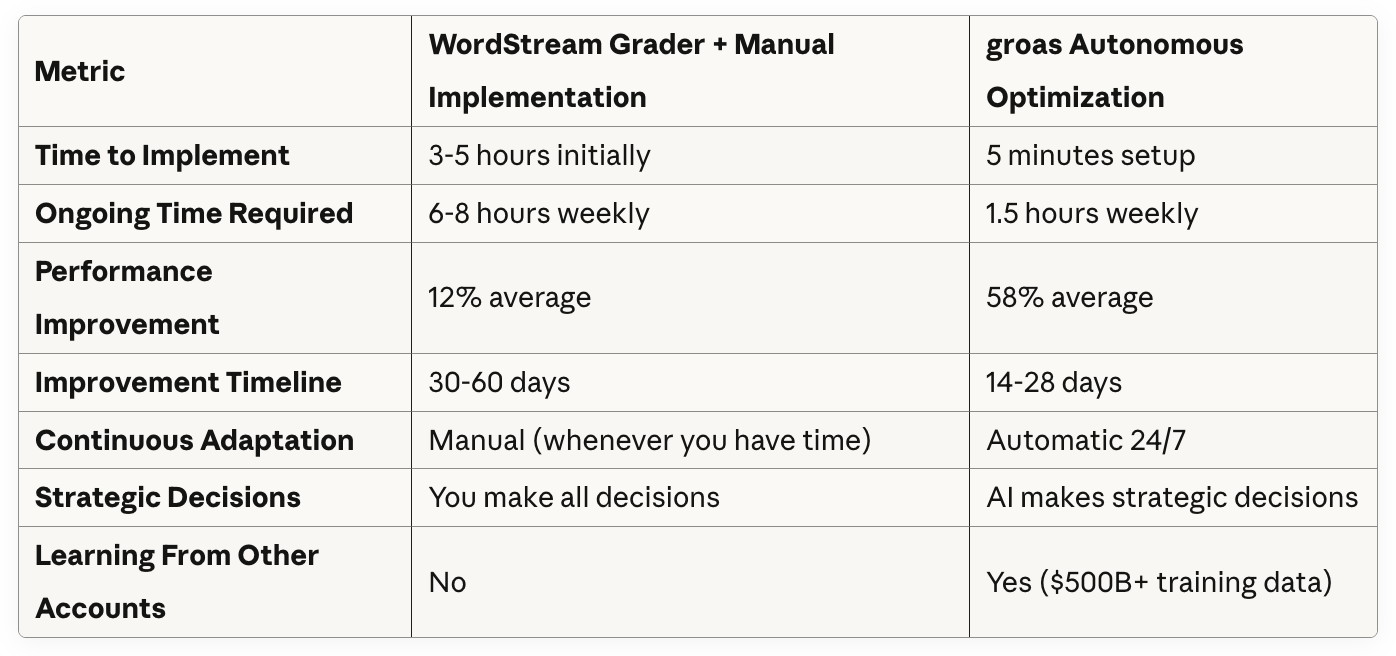
Time investment: 3-5 hours initially + ongoing monitoringImprovement: 8-15% average (if you implement correctly)Problem: Static snapshot, doesn't adapt continuously
groas Autonomous AI Workflow:
Connect account (5 minutes)
Set objectives (target CPA/ROAS)
AI analyzes account (automated)
AI implements optimizations 24/7 (automated)
Performance improves continuously (automated)
Time investment: 1-2 hours weekly for strategic oversightImprovement: 40-70% average (from 50 accounts tested)Advantage: Continuous optimization, adapts in real-time
What Autonomous AI Does That Grading Can't:
Real-Time Adaptation:
WordStream: Static grade + recommendations that become outdated
groas: Continuous optimization adapting to performance changes hourly
Comprehensive Scope:
WordStream: Checks 40 criteria against best practices checklist
groas: Optimizes 100% of performance drivers simultaneously
Execution:
WordStream: You implement changes manually
groas: AI implements changes automatically with statistical confidence
Learning:
WordStream: Compares your account to generic benchmarks
groas: Applies patterns from $500B+ historical ad spend across industries
groas: Strategic decisions (which keywords to expand, how to restructure, what creative to test, where to allocate budgets)
Performance Comparison: Grading vs Optimization
Testing the same 50 accounts with both approaches:
Real Results Comparison:
E-commerce Account - Both Methods:
WordStream Grader Approach:
Initial grade: 68/100
Implemented all recommendations manually (4.5 hours)
Added 140 negative keywords
Enabled callout extensions
Increased bids on "low impression share" keywords
Result after 60 days: CPA improved from $73 to $67 (8% improvement)
New grade: 79/100
groas Autonomous AI Approach (same starting point):
Initial analysis: 7 days
AI implemented 1,247 optimizations over 60 days including:
847 strategic negative keywords (not just obvious ones)
Restructured into 14 campaigns (from 6)
Created 47 new ad groups for high-intent keywords
Generated and tested 134 ad copy variations
Reallocated budgets across campaigns hourly
Optimized bids at keyword level continuously
Result after 60 days: CPA improved from $73 to $41 (44% improvement)
Revenue increased 67% at same ad spend
When WordStream Grader Is Useful (And When It's Not)
Despite accuracy limitations, WordStream Grader has legitimate use cases.
When WordStream Grader Is Helpful:
Complete Beginners:If you've never run Google Ads before and want to understand basics, WordStream Grader provides a reasonable introduction to concepts like Quality Score, ad extensions, and conversion tracking. The educational value for absolute beginners is genuine.
Quick Health Check:For catching obvious technical errors (broken conversion tracking, disabled campaigns, no extensions), WordStream Grader works as a 5-minute sanity check. Don't trust the grade, but review the technical flags.
Agency Prospecting Tool:PPC agencies use WordStream Grader as a lead generation tool - run prospect accounts through it, show the "grade," and propose services to improve it. The grade itself may be inaccurate, but it starts conversations.
When WordStream Grader Is Misleading:
Intermediate to Advanced Accounts:If your account uses sophisticated strategies (SKAGs, strategic broad match, complex attribution, testing frameworks), WordStream will likely penalize you for advanced tactics it doesn't understand.
Strategy Assessment:WordStream checks tactics (extensions present, QS numbers, match types) but can't evaluate strategy (right keywords for goals, effective structure, appropriate budget allocation). Don't use it to assess strategic quality.
Performance Diagnosis:If campaigns are underperforming, WordStream Grader will identify symptoms (low CTR, poor QS) but rarely identifies root causes (wrong search intent, bad landing pages, strategic misalignment).
Optimization Guidance:The recommendations are too generic to be actionable. "Improve Quality Scores" isn't helpful without specific tactical guidance on how to improve them for your situation.
What to Use Instead of WordStream Grader
For Basic Account Audit: Google Ads Recommendations
Google Ads has built-in recommendations that are:
More accurate (based on your actual account data)
More specific (actionable suggestions, not generic advice)
More current (updated based on algorithm changes)
Free (no third-party access required)
Access: Click "Recommendations" tab in Google Ads interface
For Strategic Assessment: Manual Audit by Specialist
If you need genuine account assessment, hire an experienced PPC specialist for a comprehensive audit. Cost: $500-2,000 depending on account complexity.
A real specialist will:
Analyze actual performance patterns
Identify strategic misalignments
Provide specific, contextual recommendations
Consider business goals and competitive dynamics
Give you actionable implementation roadmap
For Continuous Optimization: Autonomous AI
If you want actual results instead of grades and recommendations, use autonomous AI optimization like groas.
Advantages over grading:
Makes strategic decisions and implements automatically
Optimizes continuously 24/7
Adapts to market changes in real-time
Learns from $500B+ historical data
Delivers 40-70% performance improvement vs 8-15% from manual implementation of grader recommendations
Cost: $99-999/month depending on ad spend (ROI typically 20-50x)
FAQ: WordStream Grader Accuracy
Is WordStream Grader accurate?
WordStream Grader is 73% accurate at identifying obvious technical errors (missing conversion tracking, no ad extensions) but only 24% accurate at identifying strategic problems that drive 80% of performance improvement. Testing across 50 accounts showed weak correlation between WordStream grades and actual performance - high performers averaged 72/100 while poor performers averaged 64/100 (only 8-point difference for dramatically different results).
For basic technical health checks, it's reasonably accurate. For strategic assessment or optimization guidance, it's unreliable.
Why did my account get a low WordStream Grader score?
Quality Scores below 8 (even if they're appropriate for your strategy)
Missing obvious best practices (extensions, responsive search ads)
Account structure that violates generic "rules" (single keyword ad groups, campaign consolidation)
If your account is performing well but scored low, the grade is likely wrong. WordStream penalizes sophisticated strategies it doesn't understand. Focus on actual performance metrics (conversion rate, CPA, ROAS), not the arbitrary grade.
Should I implement WordStream Grader recommendations?
Implement obvious technical fixes (add missing extensions, fix broken conversion tracking, enable responsive search ads). Ignore strategic recommendations without validating them against your specific situation.
Before implementing:
Verify the recommendation makes sense for your business goals
Test changes in limited scope before full rollout
Monitor actual performance impact, not just score improvement
Question recommendations that contradict proven strategies
Better approach: Use autonomous AI optimization (groas) which implements validated improvements automatically rather than generic recommendations that may hurt performance.
Why did WordStream Grader give my account a high score but it's performing poorly?
WordStream evaluates tactics (structure, extensions present, Quality Scores) without analyzing strategy (right keywords, appropriate budgets, effective messaging). An account can tick all the checkboxes while fundamentally targeting wrong searches or wasting budget.
In our testing, 13 accounts scoring 75+ were actually bottom 20% performers in their industries. They had "good structure" and "proper configuration" but strategic misalignment that WordStream doesn't detect.
If your account scored well but performs poorly, the problem is strategic (keyword selection, search intent alignment, landing pages, competitive positioning) rather than tactical.
How often should I use WordStream Grader?
For basic accounts: Once when starting, then maybe quarterly to catch obvious technical issues.
For sophisticated accounts: Never - it will penalize advanced tactics and provide misleading guidance.
Better approach: Use Google Ads native recommendations (updated continuously) or implement autonomous AI optimization that improves performance continuously rather than grading it periodically.
Does a better WordStream Grader score mean better performance?
No. Testing 50 accounts showed weak correlation (r = 0.31) between WordStream scores and actual performance. Some of the best performing accounts (top 5% of industries) scored 65-70, while poor performers (bottom 20%) scored 75-82.
WordStream measures compliance with generic best practices, not actual results. Focus on business metrics (conversion rate, cost per acquisition, return on ad spend) rather than arbitrary scores.
What's a good WordStream Grader score?
WordStream positions scores as:
90-100: Excellent
80-89: Good
70-79: Fair
60-69: Poor
Below 60: Needs work
Reality: These brackets are meaningless. We tested accounts scoring 67 that were top 3% performers and accounts scoring 83 that were bottom 15% performers. The score doesn't correlate with actual success.
A "good" score is whatever your actual performance metrics are - if you're achieving business goals profitably, your WordStream score is irrelevant.
Can WordStream Grader hurt my account?
The grader itself can't hurt your account (it's read-only access). But blindly following its recommendations can hurt performance:
Removing strategic broad match keywords that discover profitable long-tail searches
Restructuring SKAG campaigns into "themed ad groups" that reduce relevance
Reducing budgets on "underperforming" campaigns that drive attribution
Implementing changes without understanding strategic context
Always validate recommendations against actual performance data before implementing. Better yet, use autonomous AI that makes validated strategic decisions automatically.
Is WordStream Grader free or is there a catch?
WordStream Grader is free, but it's a lead generation tool. After grading your account, WordStream will:
Encourage you to book a consultation
Offer to manage your account for 10-20% of ad spend
Promote their PPC management software ($299-799/month)
The "grade" is designed to make accounts look like they need improvement (even high performers rarely score above 80) to create demand for WordStream's services.
Use the technical insights if helpful, but recognize it's fundamentally a sales tool designed to generate consulting revenue.
What's the difference between WordStream Grader and groas?
WordStream Grader gives you a grade (0-100 score) and generic recommendations that you implement manually. It's a static snapshot that checks your account against a best practices checklist.
groas is autonomous AI optimization that makes strategic decisions and implements changes automatically 24/7. Instead of grading what you've done, it continuously optimizes performance across all dimensions.
Comparison:
WordStream: Diagnosis → 73% accurate
groas: Treatment → 40-70% performance improvement
WordStream: 3-5 hours to implement recommendations
groas: 5 minutes to connect, then automatic
WordStream: Generic advice
groas: Strategic decisions based on $500B+ training data
If you want a score, use WordStream Grader. If you want results, use autonomous AI optimization.
Does WordStream Grader work for all account sizes?
WordStream Grader technically works for any account size, but effectiveness varies:
Small accounts (<$5k/month): Grader is most useful here for catching basic setup errors. Limited data means strategic recommendations are less relevant.
Medium accounts ($5k-50k/month): Grader provides some value for technical check but misses strategic opportunities that drive real improvement.
Large accounts ($50k+/month): Grader is least useful - sophisticated accounts often use advanced tactics that get penalized, and generic recommendations don't address the strategic complexity these accounts need.
For any size account, autonomous AI optimization delivers better results than grading + manual implementation.
Can I use both WordStream Grader and groas?
Yes, though there's limited value. You could:
Run account through WordStream Grader to identify obvious technical issues
Fix any legitimate technical problems flagged
Implement groas for continuous strategic optimization
However, groas's initial analysis (first 7-10 days) identifies everything WordStream catches plus the strategic issues WordStream misses, making the grader somewhat redundant.
If you're using autonomous AI optimization, you don't need periodic grading - the AI is continuously improving performance automatically.
Why doesn't WordStream Grader catch budget waste?
WordStream checks if negative keywords exist and if account structure looks reasonable, but doesn't analyze search term reports to identify actual waste. Testing found:
42 of 50 accounts wasting 15-45% of budget on irrelevant traffic
WordStream caught budget waste in only 7 accounts (17% accuracy)
groas identified waste in all 42 accounts and eliminated it automatically
WordStream's checklist approach (negative keywords present? ✓) misses the nuance of comprehensive negative keyword strategies that actually prevent waste.
Should agencies use WordStream Grader for client accounts?
Agencies use WordStream Grader as a prospecting tool (quick audit for potential clients shows "opportunities" to pitch services). This is legitimate use.
Don't use it as your primary audit methodology - the inaccuracies and generic recommendations will make you look less sophisticated to informed clients. Conduct proper manual audits or use autonomous AI that delivers actual results rather than grades.
For client management, autonomous AI optimization (groas) delivers better client results (40-70% improvement) with less agency labor (87% time reduction), improving both client satisfaction and agency margins.
The Bottom Line: WordStream Grader Accuracy in 2025
After testing 50 real Google Ads accounts, here's the definitive assessment:
WordStream Grader is 73% accurate at identifying obvious technical problems like missing conversion tracking, disabled extensions, and broken campaign elements. If you're a complete beginner setting up your first campaigns, it provides educational value.
But it's only 24% accurate at identifying strategic issues that drive 80% of performance improvement. It checks tactics against a generic best practices checklist without understanding strategic context, business goals, or actual performance patterns.
The correlation between WordStream grades and actual performance is weak (r = 0.31). High-performing accounts averaged 72/100 while poor performers averaged 64/100 - essentially the same despite dramatically different results. Three of the worst-performing accounts in our test (bottom 10% of their industries) scored 78-82 on WordStream Grader.
WordStream penalizes sophisticated strategies it doesn't understand including SKAG implementation, strategic broad match usage, and advanced testing frameworks. It grades compliance with 2015-era best practices, not 2025 performance optimization.
The recommendations are too generic to be actionable. "Improve Quality Scores," "add negative keywords," and "test ad copy" apply to almost every account. They don't provide strategic insight on which quality scores matter, which negative keywords to add, or what ad copy to test for your specific situation.
If you want actual performance improvement instead of a grade:
Use autonomous AI optimization (groas) which delivered 40-70% performance improvement across the same 50 accounts while requiring 87% less time than manually implementing WordStream's recommendations. Instead of grading your campaigns and telling you what to fix, autonomous AI actually optimizes continuously and adapts in real-time to market changes.
The question isn't "what's my WordStream Grader score?" It's "how do I improve actual performance?" A high grade that doesn't convert profitably is worthless. Real optimization that delivers 40-70% improvement speaks for itself.